Camera Projection
from 3D points to screen pixels
How a 3D point reaches the screen: model, view and projection matrices, clip space, the perspective divide to NDC, then the viewport transform to pixels.
core5 min read
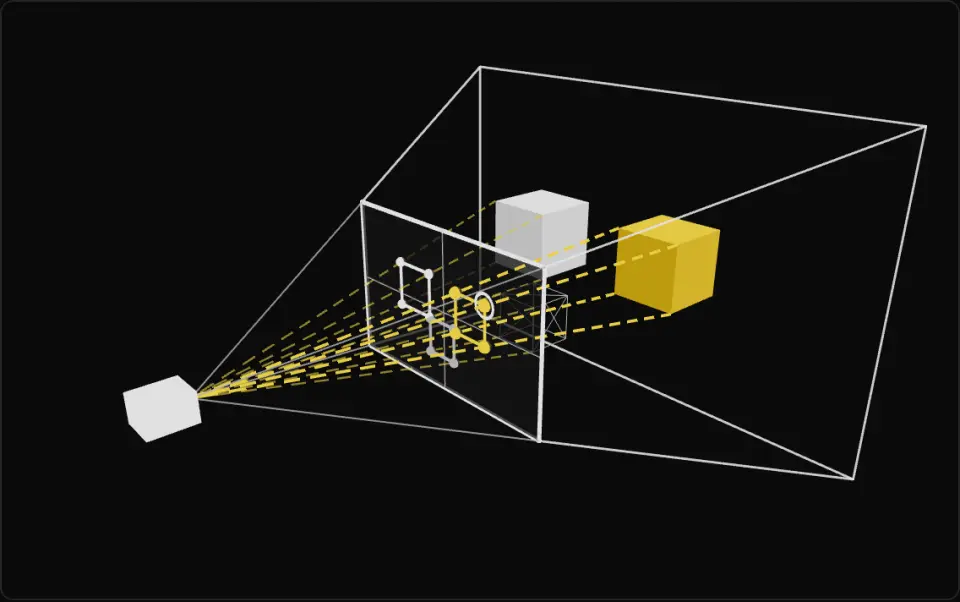
Outside view of a camera: the white wireframe is its frustum and the flat panel at the near end is the screen. Yellow dashed lines run from each box's corners through the screen to the eye (perspective) or stay parallel (orthographic); round dots and outlines on the panel show where each box lands, and a red diamond means that corner is off screen. The white ring marks the point in the readout. Move the solid yellow box away: it shrinks on screen in perspective and holds its size in orthographic, where FOV only scales the box so the screen stays comparable.
What it is
A vertex reaches the screen through a chain of spaces. The model matrix takes it from local to world space, the view matrix (the inverse of the camera's world matrix) from world to camera space, and the projection matrix from camera space to clip space. The first two are ordinary transforms; only the last one decides what the camera lens does.
Clip space is a 4D stop on the way: the GPU clips triangles against it, then divides x, y and z by w. That perspective divide lands in normalized device coordinates (NDC), a cube where x, y and z all run from -1 to 1 in the OpenGL convention Three.js uses. The viewport transform then scales NDC x and y to pixels, flipping y because pixel rows grow downward. Everything outside the cube is what frustum culling tries to reject early.
A perspective matrix copies the distance in front of the camera into w, so the divide shrinks far things: double the distance, half the size, and parallel lines converge. An orthographic matrix leaves w at 1, so the divide does nothing and size ignores distance. Use it for 2D games, isometric views, CAD and directional shadow maps.
Perspective also makes depth non-linear: NDC z follows 1/d, so about half of the whole range sits between near and 2 * near, and far surfaces share very few depth values. That is the root of z-fighting. To go the other way, from a pixel to the world, unproject it to get a ray, which is what raycasting does.
- camera
- perspective
- orthographic
- mvp
- ndc
- clip space
- world to screen
Key formulas
Rules of thumb
- Three.js
fovis vertical and in degrees. Horizontal FOV is2 * atan(tan(fov / 2) * aspect), so a wider window sees more sideways, not less vertically. - Starting vertical FOV: 45 to 60° for third-person, 60 to 75° for first-person (about 91 to 108° horizontal at 16:9), 20 to 35° for a telephoto or tactical look.
- Keep
far / nearunder about 10,000. Raisenearfirst: it helps depth precision far more than loweringfar. - To frame an object of height s, place the camera at
d = s / (2 * tan(fov / 2)), plus some margin. - Call
updateProjectionMatrix()after changingfov,aspect,near,far,zoomor the orthographic bounds. Moving or rotating the camera does not need it. - Use
canvas.clientWidthandclientHeightfor CSS pixels. The drawing buffer is larger on high-DPR displays.
Implementation
const ndc = new THREE.Vector3()const near = new THREE.Vector3()const far = new THREE.Vector3()
function worldToScreen(p: THREE.Vector3, camera: THREE.Camera, el: HTMLElement) {  camera.updateMatrixWorld()  ndc.copy(p).project(camera) // world -> view -> clip -> divide by w  // Past the far plane or behind the camera, z comes out above 1.  const visible = Math.abs(ndc.x) <= 1 && Math.abs(ndc.y) <= 1 && Math.abs(ndc.z) <= 1  return {    x: ((ndc.x + 1) / 2) * el.clientWidth,    y: ((1 - ndc.y) / 2) * el.clientHeight, // pixel y grows downward    visible,  }}
function screenToGround(px: number, py: number, camera: THREE.Camera, el: HTMLElement) { camera.updateMatrixWorld() const nx = (px / el.clientWidth) * 2 - 1 const ny = 1 - (py / el.clientHeight) * 2 near.set(nx, ny, -1).unproject(camera) // pixel on the near plane far.set(nx, ny, 1).unproject(camera) // same pixel on the far plane const dy = near.y - far.y if (dy === 0) return null // ray parallel to the ground const t = near.y / dy // where the ray crosses y = 0 return t >= 0 ? new THREE.Vector3().lerpVectors(near, far, t) : null}const camera = new THREE.PerspectiveCamera(50, 16 / 10, 0.1, 500)
function onResize(w: number, h: number) { renderer.setSize(w, h) camera.aspect = w / h camera.updateProjectionMatrix() // or the image stretches}
function setFov(fov: number) { camera.fov = fov camera.updateProjectionMatrix()}
// Fraction of the screen height covered by an object of height s at distance d.const coverage = (s: number, d: number) => s / (2 * d * Math.tan(THREE.MathUtils.degToRad(camera.fov) / 2))
// Orthographic: same screen size at any distance. Set the box from the height.const viewH = 10const a = 16 / 10const ortho = new THREE.OrthographicCamera( (-viewH * a) / 2, (viewH * a) / 2, viewH / 2, -viewH / 2, 0.1, 500)Common mistakes
- Changing
camera.fovorcamera.aspectand forgettingupdateProjectionMatrix(), so nothing changes or the image stretches on resize. - Trusting x and y from
project()for a point behind the camera. The divide by a negative w mirrors them, so check z too before placing a label. - Forgetting the y flip: NDC y points up, pixel y points down.
- Reading
project()z as a distance. It is non-linear; usecamera.position.distanceTo(p)or view-space z for real distances. - Calling
project()right after moving the camera in the same frame withoutupdateMatrixWorld(): it uses the stalematrixWorldInversefrom the last render.
Prompt
# Camera Projection
- Write a TypeScript Three.js module with two helpers.- `worldToScreen(point, camera, canvas)` returns CSS pixel coordinates using Vector3.project, plus a `visible` flag that is false when |ndc.x|, |ndc.y| or |ndc.z| exceeds 1. `screenToGround(px, py, camera, canvas, groundY = 0)` unprojects the pixel at NDC z = -1 and z = 1 to build a ray, then intersects the plane y = groundY and returns the hit point or null when the ray is parallel or points away.- Both must work for PerspectiveCamera and OrthographicCamera, call camera.updateMatrixWorld() first, and read canvas.clientWidth and clientHeight, not the drawing buffer size, so high-DPR displays work.- Edge cases: a point behind the camera is not visible; a zero-sized canvas returns null.- Include a Vitest test: for a camera at (0, 5, 10) looking at the origin, screenToGround(worldToScreen(p)) returns p for several ground points, within 1e-6.
In learning paths
Related
Further reading
Updated 2026-11-02
