MathematicsVectorscore4 min read
Dot and Cross Product
one number for alignment, one vector for perpendicular
The dot product measures how aligned two vectors are and projects one onto the other. The cross product builds a perpendicular normal.
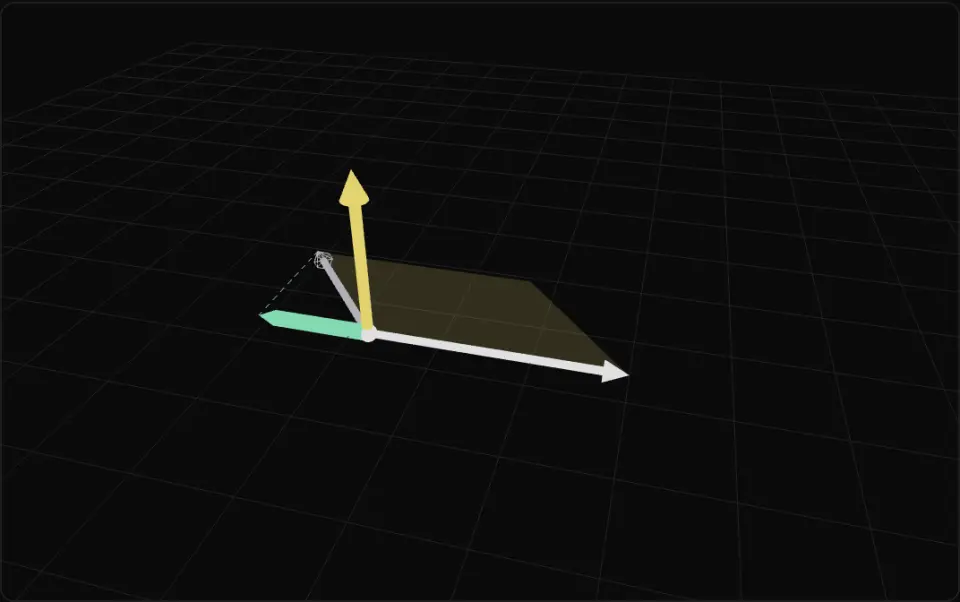
The solid white arrow a lies on the floor and the grey arrow b (wireframe head) turns around it. The thick green bar is b's projection onto a, with a green dashed drop line from b's tip; it shrinks to nothing at 90° and flips behind past it. The yellow arrow standing up is a × b, and its length tracks the area of the yellow shaded parallelogram, so both peak at 90° and the arrow flips down past 180°.
What it is
The dot product a · b multiplies matching components and adds them, giving one number. It also equals |a||b| cos θ, so with unit vectors it is the cosine of the angle between them: 1 same direction, 0 perpendicular, -1 opposite. That makes it the go-to test for "is the target in front of me?", "is this surface facing the light?" and "is this slope walkable?" (compare with a normal).
Dotting a vector with a unit axis gives its signed length along that axis: the projection, or the shadow it casts on that line. Subtract the projection and what remains is the part perpendicular to the axis. That is how you split velocity into along-the-wall and into-the-wall parts, or measure how far a point is along a path.
The cross product a × b (3D only) returns a new vector perpendicular to both, following the right-hand rule: x × y = z. Its length is |a||b| sin θ, the area of the parallelogram the two vectors span, so half of it is a triangle's area. Use it to build surface normals from two triangle edges, to build an orthonormal camera basis, or, via the sign of up · (forward × toTarget), to decide whether to turn left or right.
Order matters for the cross product: b × a = -(a × b). If your normals point inward, the triangle winding or the operand order is flipped. Both products build on plain vectors.
- dot product
- cross product
- projection
- normal
- angle
- field of view
Key formulas
- Dot product
- Projection of b onto a
If a is already unit length the denominator is 1.
- Cross product
- Cross length = parallelogram area
Rules of thumb
- Field-of-view check: precompute
cos(halfAngle)once (cos 45° ≈ 0.707 for a 90° cone) and compare it withdot(forward, dirToTarget). Noacosper frame. - Walkable ground:
dot(normal, up) > 0.7allows slopes up to about 45°; 0.85 allows about 32°. - Use
Math.acosonly when you really need the angle, and clamp its input to [-1, 1] first; rounding can push a dot of unit vectors to 1.0000001. - Triangle normal = normalize((b − a) × (c − a)). Counter-clockwise winding (Three.js default front face) gives the outward normal.
- The cross product of parallel vectors is zero. Check its length before normalizing (for example when building a basis with
upand a vertical forward).
Implementation
const toTarget = new THREE.Vector3()const turnAxis = new THREE.Vector3()const UP = new THREE.Vector3(0, 1, 0)const COS_HALF_FOV = Math.cos(THREE.MathUtils.degToRad(45))
function canSee(eye: THREE.Vector3, forward: THREE.Vector3, target: THREE.Vector3, range: number) {  toTarget.subVectors(target, eye)  const d2 = toTarget.lengthSq()  if (d2 > range * range || d2 < 1e-8) return false  toTarget.divideScalar(Math.sqrt(d2))           // normalize  return forward.dot(toTarget) >= COS_HALF_FOV   // forward is unit length}
function turnSign(forward: THREE.Vector3, target: THREE.Vector3, eye: THREE.Vector3) { toTarget.subVectors(target, eye) turnAxis.crossVectors(forward, toTarget) return Math.sign(turnAxis.dot(UP)) // +1 turn left, -1 turn right}into = dot(velocity, wallNormal) // negative when moving into the wallif into < 0: velocity = velocity - wallNormal * into // keep only the tangential partCommon mistakes
- Using the dot of non-normalized vectors as a cosine. It is scaled by both lengths, so a far target looks "more in front".
- Swapping the cross product's operands and getting normals that point inward, which flips lighting and culling.
- Calling
Math.acoson a dot slightly above 1 and getting NaN. Clamp first. - Normalizing the cross product of nearly parallel vectors, which amplifies noise into a random direction.
Prompt
Write TypeScript helpers for Three.js using THREE.Vector3 scratch objects (no per-call allocations): `isInFront(viewer, forward, target)` (dot of forward with the normalized offset > 0), `inViewCone(viewer, forward, target, halfAngleDeg, range)` that compares the dot with a precomputed cos(halfAngle) and squared range, `projectOnto(v, axis, out)` that is zero-safe, `triangleNormal(a, b, c, out)` = normalize((b - a) × (c - a)) and `triangleArea(a, b, c)` = |(b - a) × (c - a)| / 2, and `signedTurn(forward, toTarget, up)` returning the sign of dot(up, forward × toTarget) to choose left or right. Write Vitest tests: perpendicular vectors give dot 0; cross is perpendicular to both inputs; x × y = z; triangle area of (0,0,0),(2,0,0),(0,2,0) is 2; the cone check matches an acos-based reference for random points.In learning paths
Related
Further reading
Updated 2026-11-01