Three.js & RenderingMaterials & Lightcommon4 min read
PBR Materials
describe the surface, let physics light it
Physically based rendering describes surfaces with base colour, roughness and metalness, so one material looks right under any lighting and environment.
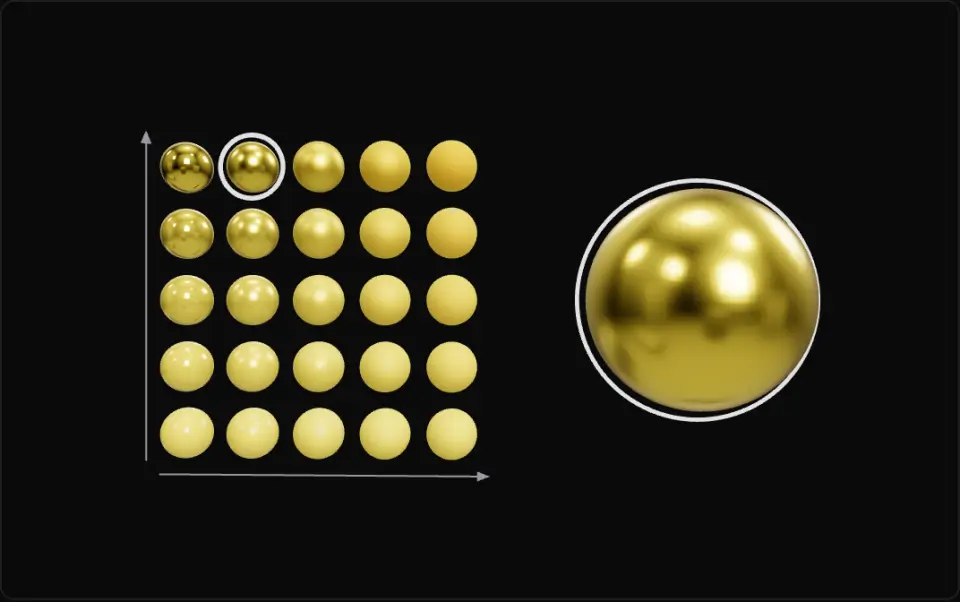
Left grid: roughness grows to the right and metalness grows upward, all lit by a procedural room environment that slowly turns. The white ring marks the cell nearest the sliders, and the large sphere on the right is the exact selected material. Turn on clear coat to add a glossy lacquer layer.
What it is
Physically based rendering (PBR) separates *what a surface is* from *how it is lit*. Instead of tweaking a highlight colour per scene, you describe the material with a few physical parameters, and a lighting model that conserves energy turns them into pixels. The same asset then looks right in a sunny level, a dark cave and a studio turntable.
The common metal/rough workflow (glTF 2.0, Three.js, Unity, Unreal) uses three main inputs. Base colour (albedo) is the diffuse colour for non-metals and the reflection tint for metals; it contains no lighting or shadows. Metalness is 0 for dielectrics (plastic, wood, skin, stone) and 1 for bare metal; values in between are only for transitions such as rust or dust. Roughness spreads reflections: 0 is a mirror, 1 is chalk.
Every surface reflects more at grazing angles (Fresnel). The head-on reflectance F0 is about 4% for dielectrics and equals the base colour for metals, so the shader derives it as mix(0.04, baseColor, metalness). Energy conservation means light that is reflected specularly is not also scattered diffusely, and metals have no diffuse part at all.
In Three.js, MeshStandardMaterial implements this model; MeshPhysicalMaterial adds clearcoat, transmission, sheen and iridescence. PBR needs environment lighting (scene.environment) to look right, because a smooth metal only reflects its surroundings. A procedural RoomEnvironment run through PMREMGenerator gives good image-based lighting without downloading an HDR file.
- pbr
- materials
- roughness
- metalness
- fresnel
- ibl
Key formulas
- Metal/rough F0
- Fresnel (Schlick)
- Energy split
m = metalness. Metals (m = 1) have no diffuse term at all.
- Cook–Torrance specular
D: microfacet distribution (GGX), G: self-shadowing.
Rules of thumb
- Base colour stays within about sRGB 30–240 for non-metals (charcoal ≈ 50, fresh snow ≈ 240). Pure black or white albedo doesn't occur in nature.
- Metalness is 0 or 1 for almost every pixel. Use in-between values only in thin transition areas.
- Raw metal base colours are bright, around sRGB 180–255 (gold ≈ (255, 195, 86), iron ≈ (196, 199, 199)).
- Keep roughness ≥ 0.04. A perfect mirror leaves only aliased, pin-point highlights.
- Pack textures the glTF way: roughness in G, metalness in B of one
metalnessRoughnessMap; base colour textures are sRGB, data maps are linear.
Implementation
import * as THREE from "three"import { RoomEnvironment } from "three/examples/jsm/environments/RoomEnvironment.js"
renderer.toneMapping = THREE.ACESFilmicToneMappingconst pmrem = new THREE.PMREMGenerator(renderer)scene.environment = pmrem.fromScene(new RoomEnvironment(), 0.04).texturepmrem.dispose()
const gold = new THREE.MeshStandardMaterial({ color: 0xf3c35b, metalness: 1, roughness: 0.25,})const carPaint = new THREE.MeshPhysicalMaterial({ color: 0xc8312a, metalness: 0, roughness: 0.5, clearcoat: 1, clearcoatRoughness: 0.05, // glossy lacquer over a rough base})const glass = new THREE.MeshPhysicalMaterial({ roughness: 0, transmission: 1, ior: 1.5, thickness: 0.5,})vec3 F0 = mix(vec3(0.04), baseColor, metalness);float a = roughness * roughness;vec3 F = F0 + (1.0 - F0) * pow(1.0 - max(dot(V, H), 0.0), 5.0);vec3 kd = (1.0 - F) * (1.0 - metalness); // energy conservationvec3 spec = D_GGX(N, H, a) * G_Smith(N, V, L, a) * F / max(4.0 * max(dot(N, V), 0.0) * max(dot(N, L), 0.0), 1e-4);vec3 Lo = (kd * baseColor / PI + spec) * lightColor * max(dot(N, L), 0.0);Common mistakes
- No
scene.environment. Metals render almost black because there is nothing for them to reflect. - Baking lighting, shadows or ambient occlusion into the base colour texture. Put AO in
aoMapand keep albedo flat. - Loading roughness or metalness maps as sRGB. They are linear data, and gamma-decoding them skews every value.
- Mid-grey metalness (0.5) everywhere to get a "semi-metal" look. It is physically meaningless; vary roughness instead.
- Fetching an HDR from a CDN at runtime. It breaks offline and under strict CSP; generate or bundle the environment.
Prompt
Set up physically based materials in a Three.js scene with TypeScript, without loading any remote files. Generate image-based lighting from `RoomEnvironment` (three/examples/jsm/environments) through `PMREMGenerator.fromScene(room, 0.04)` and assign it to `scene.environment`; dispose the generator and texture on teardown. Set `renderer.toneMapping = THREE.ACESFilmicToneMapping` and keep output colour space sRGB. Build a 5×5 grid of spheres with `MeshStandardMaterial`, roughness 0→1 along x and metalness 0→1 along y, all sharing one geometry, and one large `MeshPhysicalMaterial` sphere driven by UI sliders for roughness, metalness and clearcoat. Clamp roughness to at least 0.04. Also export a pure function `f0(baseColor, metalness)` = lerp(0.04, baseColor, metalness) per channel, with a unit test for metalness 0 and 1.In learning paths
Related
- Reflection and Refractionlight splits at a surface: some bounces, the rest bends
- Surface Normalsthe unit arrow that says which way a surface faces
- Fragment Shadersa tiny program that runs once for every pixel
- Texture Atlasmany images, one texture, one material
- Lerp and Smoothstepblend between two values, then make the blend feel good
Further reading
Updated 2026-11-01