Three.js & RenderingRenderingcommon4 min read
Stencil Buffer Masks
paint an invisible shape, then draw only inside it
Write a mask mesh into the stencil buffer, then draw hidden objects only where the stencil matches: vision reveals, x-ray views and portals.
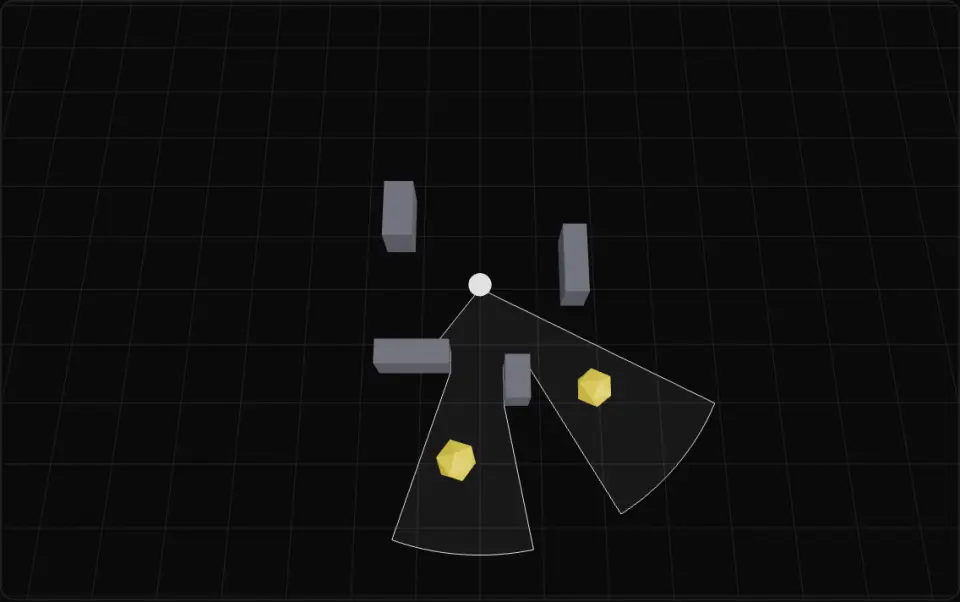
Top-down room: the white ball is the guard, the white outline and faint fill are its field-of-view mesh, which also writes the stencil. Solid yellow shapes are hidden objects drawn only where the stencil equals 1; solid grey walls are always drawn and cut the cone. Turn the mask off to see every hidden object, or widen the view angle.
What it is
The stencil buffer stores a small integer (8 bits) per pixel next to the depth buffer. Draws can write to it and can be rejected by a per-pixel test against it, so it acts as a mask the GPU checks per pixel before a fragment shader result reaches the colour buffer. Nothing in it is ever displayed.
A reveal takes two passes ordered with renderOrder. The mask mesh writes: stencilWrite: true, stencilFunc: AlwaysStencilFunc, stencilRef: 1, stencilZPass: ReplaceStencilOp, plus colorWrite: false and depthWrite: false so it stays invisible and does not hide anything. The revealed meshes test: stencilWrite: true (in Three.js this flag turns stencil testing on for the material), stencilRef: 1, stencilFunc: EqualStencilFunc. Their pixels survive only where the mask drew.
Use a guard's visibility mesh as the mask and enemies or loot show up only inside what the guard sees. The same trick gives x-ray silhouettes behind walls, portals and windows into another scene, scopes, and cut-away views. Use different stencilRef values for several masks at once.
The buffer must exist. WebGLRenderer takes stencil in its constructor and it defaults to false in current Three.js, so pass stencil: true (<Canvas gl={{ stencil: true }}> in React Three Fiber) and confirm with gl.getContext().getContextAttributes().stencil. Without it the test silently passes everywhere. Render targets have their own: new WebGLRenderTarget(w, h, { stencilBuffer: true }).
- stencil
- mask
- render order
- portal
- x-ray
- material
Key formulas
- Mask pass (Always, Replace on z-pass)
- Reveal pass (Equal)
stencilFuncMask defaults to 0xff, so this is just S = ref.
Rules of thumb
- Renderer:
stencil: true; the stencil is cleared each frame with depth whenautoClear(andautoClearStencil) are on. - Mask renderOrder lower than revealed objects (e.g. 1 vs 2); opaque objects draw before transparent ones, and renderOrder sorts within each list.
- Mask material: colorWrite false, depthWrite false, depthTest true so walls in front can still cut it.
- 8 bits: stencilRef 1–255. Use IncrementWrapStencilOp to count overlaps, or separate refs per portal.
- The mask is screen-space: a flat floor mask cuts off the tops of tall objects at grazing angles, so use a top-down camera or extrude the mask into a volume.
Implementation
const renderer = new THREE.WebGLRenderer({ antialias: true, stencil: true })
const maskMat = new THREE.MeshBasicMaterial({  colorWrite: false,                     // invisible  depthWrite: false,                     // does not occlude  stencilWrite: true,  stencilRef: 1,  stencilFunc: THREE.AlwaysStencilFunc,  stencilZPass: THREE.ReplaceStencilOp,  // write ref where it draws})const fovMask = new THREE.Mesh(fovGeometry, maskMat)fovMask.renderOrder = 1
const hiddenMat = new THREE.MeshStandardMaterial({  color: 0xf5d547,  stencilWrite: true,                    // enables the stencil test  stencilRef: 1,  stencilFunc: THREE.EqualStencilFunc,   // only where the mask wrote 1})for (const enemy of enemies) {  enemy.material = hiddenMat  enemy.renderOrder = 2}
Common mistakes
- Forgetting
stencil: trueon the renderer (or the R3F Canvasglprop): with no stencil buffer the test always passes and the mask does nothing. - Leaving colorWrite or depthWrite on for the mask, so it paints a flat shape or hides the objects it should reveal.
- Drawing the hidden objects before the mask; without renderOrder the opaque sort may put them first.
- Expecting
stencilFuncalone to work: in Three.jsstencilWrite: trueis what enables the stencil test, even for read-only materials. - Post-processing passes that use their own render targets without stencilBuffer: true, which drops the mask.
Prompt
In TypeScript + Three.js, implement a stencil reveal: create the WebGLRenderer with `stencil: true` (in React Three Fiber: `<Canvas gl={{ stencil: true }}>`). Write `makeMaskMaterial(ref)` returning a MeshBasicMaterial with colorWrite false, depthWrite false, stencilWrite true, stencilRef = ref, stencilFunc AlwaysStencilFunc, stencilZPass ReplaceStencilOp, and `makeRevealMaterial(base, ref)` that clones a material and sets stencilWrite true, stencilRef = ref, stencilFunc EqualStencilFunc. Give the mask mesh renderOrder 1 and revealed meshes renderOrder 2, and add `setRevealEnabled(material, on)` that toggles stencilWrite. At startup, if `renderer.getContext().getContextAttributes()?.stencil` is false, log a warning and fall back to a WebGLRenderTarget with stencilBuffer: true. Write Vitest tests that the material flags and render orders are set as specified and that toggling does not create new materials.Related
Further reading
Updated 2026-11-02