MathematicsTransformscore3 min read
Local vs World Space
every position is relative to someone
A child's position is stored relative to its parent. Chain the parent matrices to reach world space, or invert the chain to come back.
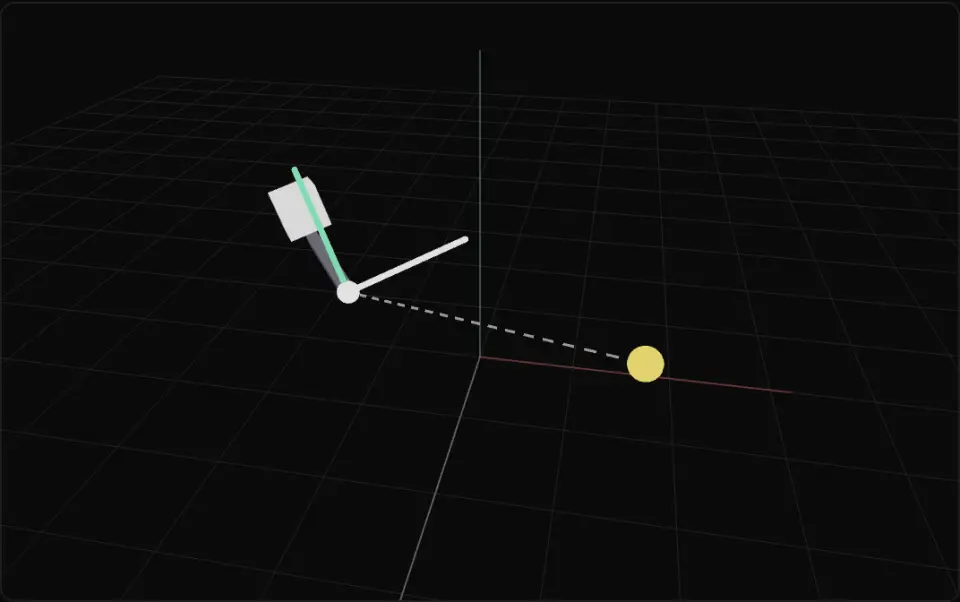
The grey arm is the parent and spins around its own Y; its thick local axes (X red, Y green, Z white) turn with it while the thin faint world axes stay put. The solid white cube is the child. The yellow ball is a fixed world point, with a grey dashed line from the parent origin. Switch the child to the world with add() or attach(): the grey outline marks where it would have stayed as a child.
What it is
A scene graph is a tree. Each object's position, rotation and scale are local: measured in its parent's coordinate frame. A wheel at (1.2, 0, 0) sits 1.2 units along the car's own X axis, wherever the car is and however it is turned. Move or rotate the parent and every child comes along for free.
World space is the frame of the scene root. To get there, multiply up the chain: world = parent.matrixWorld · child.matrix. Going back the other way uses the inverse. In Three.js, obj.localToWorld(v) and obj.worldToLocal(v) do this for points, and getWorldPosition, getWorldQuaternion and getWorldDirection read the composed result.
Re-parenting is where bugs hide. parent.add(child) keeps the child's local numbers, so it jumps to a new place in the world. parent.attach(child) keeps its world pose by rewriting the local transform with the new parent's inverse. Pick-ups, sockets and dropping items almost always want attach.
Use local space for anything that should ride along (turrets, held items, muzzle flashes), world space for physics, AI and gameplay queries, and convert only at the boundary. The maths is in transforms and matrices.
- local space
- world space
- scene graph
- parent
- localToWorld
Key formulas
- Local → world
The yellow point is the same place in both frames; only its coordinates change.
- World → local
- World matrix of a chain
- attach() keeps the world pose
Rules of thumb
localToWorldandworldToLocalmutate the vector you pass in; clone or use a scratch vector.- Both read
matrixWorld. If you moved something this frame, callobj.updateWorldMatrix(true, false)first. - Directions: use
transformDirection(or rotate by the world quaternion), neverlocalToWorld, which adds the position. - Keep hierarchies shallow (≈ 3–5 levels) for gameplay objects; every level is another matrix multiply per frame.
- Avoid non-uniform scale on parents of rotated children: the children shear.
Implementation
const tmp = new THREE.Vector3()
// Where is the muzzle (local to the gun) in the world?gun.updateWorldMatrix(true, false)const muzzle = gun.localToWorld(tmp.set(0, 0, 0.8))
// Where is the enemy relative to the turret? (x > 0: to its right)const rel = turret.worldToLocal(tmp.copy(enemy.position))
// Pick up: keep the sword exactly where it is in the world.hand.attach(sword)   // rewrites sword.position/quaternion for the new parent// hand.add(sword)   // keeps local numbers → sword jumps
// Drop it back into the world, still in place.scene.attach(sword)
// World-space facing direction (local +Z).const forward = player.getWorldDirection(new THREE.Vector3())
Common mistakes
- Using
addwhen re-parenting and watching the item teleport. Useattach. - Comparing a child's local
positionwith another object's world position. - Calling
worldToLocalbefore the parent'smatrixWorldis updated, getting last frame's answer. - Converting a direction with
localToWorld, which adds the parent's position to it. - Forgetting that
localToWorld(v)modifiesvin place and then reusingvas if it were unchanged.
Prompt
In TypeScript with Three.js, write a `Socket` helper for attaching items to a character: `mount(item, socket)` re-parents the item so it keeps its current world pose (use socket.attach), `drop(item, scene)` re-parents it back to the scene keeping its world pose, and `muzzleWorld(gun, out)` returns the world position of the local point (0, 0, 0.8) on the gun without allocating. Make sure matrixWorld is up to date before converting (updateWorldMatrix(true, false)). Also write `toLocalDirection(obj, worldDir, out)` that rotates a world direction into the object's space without applying translation. Add Vitest tests: localToWorld then worldToLocal returns the original point within 1e-6 for a rotated, scaled, nested hierarchy; attach keeps the world position while add changes it.In learning paths
Related
Further reading
Updated 2026-11-01