Barycentric Coordinates and UVs
three weights that say where you are in a triangle
Describe a point in a triangle with three weights that sum to 1. GPUs blend UVs, normals and colours with them, and raycast hits use them to find the UV.
common5 min read
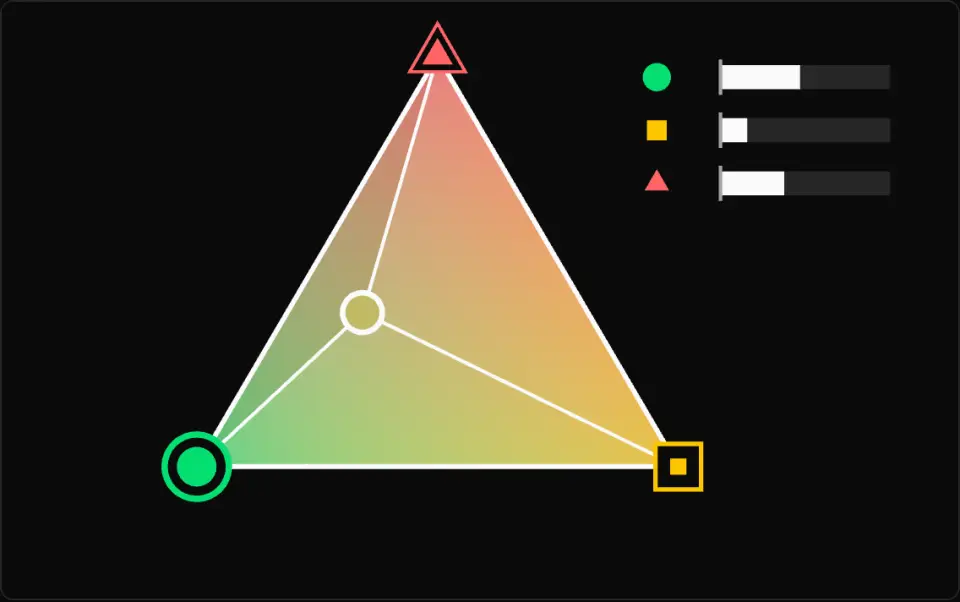
The fill blends the corner colours by the weights: green circle A (u), yellow square B (v), red triangle C (w), each corner mark filling up as its weight grows. White lines from the point split the triangle into three sub-triangles, stepped from dark grey to white by weight, and the sub-triangle opposite a corner carries that corner's weight. The white-rimmed dot shows the sampled colour; past an edge it becomes a hollow red ring and that row's bar flips left of its tick in red. The three bars at top right, marked with the same corner shapes, track u, v and w live. Turn the auto path off to set u and v by hand.
What it is
Any point in a triangle's plane can be written as a weighted mix of its three corners: P = u·A + v·B + w·C, with u + v + w = 1. Those weights are its barycentric coordinates. Each one is an area ratio: u is the area of the sub-triangle opposite A (P, B, C) divided by the whole triangle's area. As P slides toward A that opposite sub-triangle grows, so u climbs to 1 exactly at A.
The same weights blend anything stored per vertex, which is lerp extended to three inputs. The rasterizer computes them for every pixel and uses them to fill in vertex colours, normals and UVs. UVs are that mapping at work: each vertex stores a 2D location in a texture, usually 0 to 1 across the image, and the pixels in between sample whatever location the weights produce. A texture atlas is the same idea with each mesh's UVs pointing into its own small rectangle of a shared image.
The weights also give you a point-in-triangle test: P is inside when all three are >= 0. Past an edge, the weight of the corner opposite that edge goes negative, because the sub-triangle has flipped over. They can be solved with dot products alone, as the code below shows.
Weights measured on screen are not the right weights in 3D, since far parts of a triangle are squeezed by perspective. Perspective-correct interpolation fixes this: attr/w and 1/w (with w the vertex's clip-space w) vary linearly across the screen, so the GPU blends those two and divides. In Three.js, a raycast hit on a mesh hands you the results directly: hit.uv, hit.normal and hit.barycoord, the weights for the corners hit.face.a, b and c.
- barycentric
- UV
- interpolation
- point in triangle
- perspective correct
- raycast
Key formulas
Rules of thumb
- Solve two weights and get the third as
1 - v - w, so the sum is always 1 up to rounding. - Inside test on 32-bit floats: use
>= -1e-6rather than>= 0for coordinates near 1, or points on a shared edge can miss both triangles. - Check the denominator first. It is zero for a triangle with no area;
THREE.Triangle.getBarycoordreturnsnullin that case. - Renormalize interpolated normals: a blend of unit vectors is shorter than 1, about 0.58 at worst for three perpendicular ones.
- UV (0, 0) is the bottom-left of an image in Three.js by default, because
texture.flipYis true. glTF textures load withflipY = false, as that format's UVs start at the top-left. - UVs outside 0 to 1 are legal. The default
ClampToEdgeWrappingrepeats the border pixel; setRepeatWrappingto tile. - Use a
flatvarying in GLSL (ES 3.00) to switch interpolation off, for IDs and other values that must not blend.
Implementation
const e0 = new THREE.Vector3()const e1 = new THREE.Vector3()const e2 = new THREE.Vector3()
/** Writes (u, v, w) into out for P = uA + vB + wC. False if the triangle is flat. */function solveBarycentric(p: THREE.Vector3, a: THREE.Vector3, b: THREE.Vector3, c: THREE.Vector3, out: THREE.Vector3) {  e0.subVectors(b, a)  e1.subVectors(c, a)  e2.subVectors(p, a)  const d00 = e0.dot(e0)  const d01 = e0.dot(e1)  const d11 = e1.dot(e1)  const d20 = e2.dot(e0)  const d21 = e2.dot(e1)  const denom = d00 * d11 - d01 * d01  if (denom <= 1e-12 * d00 * d11) return false  const v = (d11 * d20 - d01 * d21) / denom  const w = (d00 * d21 - d01 * d20) / denom  out.set(1 - v - w, v, w)  return true}
const isInside = (b: THREE.Vector3, eps = 1e-6) => b.x >= -eps && b.y >= -eps && b.z >= -epsconst raycaster = new THREE.Raycaster()const tint = new THREE.Vector3()
function pickTexel(pointer: THREE.Vector2, camera: THREE.Camera, mesh: THREE.Mesh, width: number, height: number) { raycaster.setFromCamera(pointer, camera) const hit = raycaster.intersectObject(mesh)[0] if (!hit?.uv || !hit.face || !hit.barycoord) return null
// UV to pixel: row 0 of an image is its top, while v = 0 is the bottom. const x = Math.floor(hit.uv.x * width) const y = Math.floor((1 - hit.uv.y) * height)
// Any other attribute: blend the hit face's three corners with barycoord. const colors = mesh.geometry.attributes.color as THREE.BufferAttribute const { a, b, c } = hit.face THREE.Triangle.getInterpolatedAttribute(colors, a, b, c, hit.barycoord, tint) return { x, y, tint }}Common mistakes
- Mixing conventions. Here, as in
hit.barycoord, each weight belongs to the corner in the same position (u to A, v to B, w to C). Ray-triangle code often returnsufor B andvfor C, with the first corner getting1 - u - v. - Linearly blending attributes with screen-space weights on a tilted triangle. Textures swim and bend along the triangle's diagonal; divide by w as above.
- Reading
hit.uvas the sampled location on a texture withrepeatoroffsetset. It is the raw mesh value; calltexture.transformUv(uv)on a copy to apply them. - Assuming every mesh has UVs.
hit.uvis undefined when the geometry has nouvattribute, andhit.barycoordisnullon line and point hits. - Solving weights on a skinny triangle without first checking for zero area, which divides by nearly zero and returns huge or NaN weights.
Prompt
# Barycentric Coordinates and UVs
- Write a TypeScript module with no dependencies that works on plain number arrays of any dimension: `barycentric(p, a, b, c, out?)` solving p = u·a + v·b + w·c with u + v + w = 1 using only dot products of the edges b - a, c - a and p - a, returning (1, 0, 0) instead of NaN when the triangle has zero area (test the denominator against a small epsilon scaled by the squared edge lengths); `pointInTriangle(p, a, b, c, eps = 1e-9)` that is true when all weights are >= -eps and always false for a zero-area triangle; `interpolate(weights, a, b, c, out)` for vertex attributes; and `interpolatePerspective(weights, attr, clipW)` that blends attr/w and 1/w and divides.- Write Vitest tests: corners give (1,0,0), (0,1,0), (0,0,1); the centroid gives thirds; weights always sum to 1 and rebuild p; weights match signed sub-triangle area ratios; a point past an edge has one negative weight; collinear and coincident corners stay finite; the screen midpoint of an edge with clip w of 1 and 3 yields an attribute 0.25 of the way along.
Related
Further reading
Updated 2026-11-02
